PETPrep: A Robust Preprocessing Pipeline for PET Data
PETPrep is a NiPreps (NeuroImaging PREProcessing toolS) application (www.nipreps.org) for the preprocessing of positron emission tomography (PET) imaging.




About
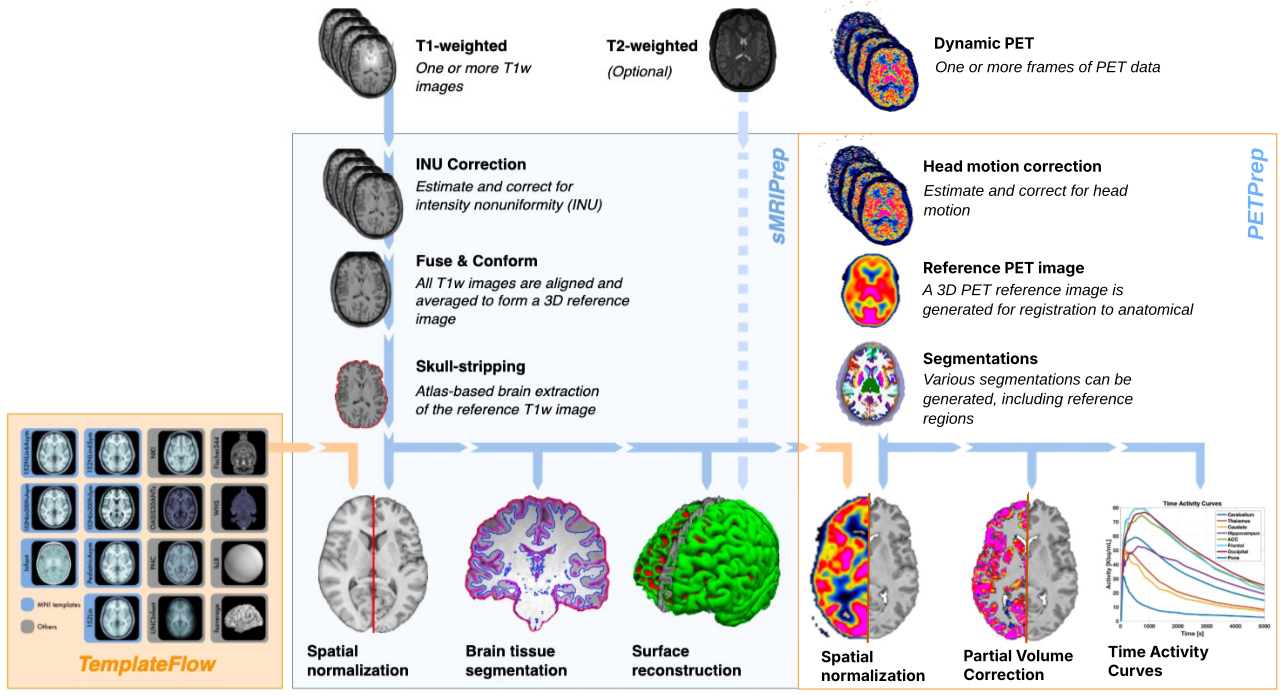
PETPrep is a positron emission tomography (PET) data preprocessing pipeline that is designed to provide an easily accessible, state-of-the-art interface that is robust to variations in scan acquisition protocols and that requires minimal user input, while providing easily interpretable and comprehensive error and output reporting. It performs comprehensive processing steps—such as motion correction, segmentation, registration, partial volume correction, and extraction of time activity curves, providing outputs that can be easily submitted to a variety of group level analyses, pharmacokinetic modelling, graph theory measures, and surface or volume-based statistics.
Note
PETPrep performs minimal preprocessing. Here we define ‘minimal preprocessing’ as motion correction, generation of a 3D PET reference image, normalization, and brain mask extraction. See the workflows section of our documentation for more details.
The PETPrep pipeline uses a combination of tools from well-known software packages, including FSL_, ANTs_, FreeSurfer, AFNI, PETSurfer and PETPVC. This pipeline was designed to provide the best software implementation for each state of preprocessing, and will be updated as newer and better neuroimaging software become available.
This tool allows you to easily do the following:
Take PET data from raw to fully preprocessed form.
Apply motion correction to minimize artifacts from subject movement.
Segment anatomy for improved regional characterization.
Register data within and across subjects, and to template spaces.
Perform partial volume correction.
Extract time activity curves for pharmacokinetic modelling.
Implement tools from different software packages.
Achieve optimal data processing quality by using the best tools available.
Generate preprocessing quality reports, with which the user can easily identify outliers.
Receive verbose output concerning the stage of preprocessing for each subject, including meaningful errors.
Automate and parallelize processing steps, which provides a significant speed-up from manual processing or shell-scripted pipelines.
At startup, PETPrep checks each selected subject for the required PET and T1w inputs. Subjects missing PET and/or T1w data are skipped, and a warning is emitted before subject-level workflows are built.
PETPrep also extracts regional time-activity curves as tabular files with frame timings and uptake values. These tables can be fed directly into pharmacokinetic modeling tools such as kinfitr or PMOD to estimate tracer kinetics or compute binding estimates.
More information and documentation can be found at https://petprep.readthedocs.io/
Principles
PETPrep is built around three principles:
Robustness - The pipeline adapts the preprocessing steps depending on the input dataset and should provide results as good as possible independently of scanner make and scanning parameters.
Ease of use - Thanks to dependence on the BIDS standard (BIDS), manual parameter input is reduced to a minimum, allowing the pipeline to run in an automatic fashion.
“Glass box” philosophy - Automation should not mean that one should not visually inspect the results or understand the methods. Thus, PETPrep provides visual reports for each subject, detailing the accuracy of the most important processing steps. This, combined with the documentation, can help researchers to understand the process and decide which subjects should be kept for the group level analysis.
Citation
Citation boilerplate. Please acknowledge this work using the citation boilerplate that PETPrep includes in the visual report generated for every subject processed. For a more detailed description of the citation boilerplate and its relevance, please check out the NiPreps documentation.
Plagiarism disclaimer. The boilerplate text is public domain, distributed under the CC0 license, and we recommend PETPrep users to reproduce it verbatim in their works. Therefore, if reviewers and/or editors raise concerns because the text is flagged by automated plagiarism detection, please refer them to the NiPreps community and/or the note to this effect in the boilerplate documentation page.
License information
PETPrep adheres to the general licensing guidelines of the NiPreps framework.
License
Copyright (c) the NiPreps Developers.
As of the 0.0.1 release series, PETPrep is licensed under the Apache License, Version 2.0 (the “License”); you may not use this file except in compliance with the License. You may obtain a copy of the License at http://www.apache.org/licenses/LICENSE-2.0.
Unless required by applicable law or agreed to in writing, software distributed under the License is distributed on an “AS IS” BASIS, WITHOUT WARRANTIES OR CONDITIONS OF ANY KIND, either express or implied. See the License for the specific language governing permissions and limitations under the License.
Acknowledgements
This work is steered and maintained by the NiPreps Community. This was supported by the BRAIN Initiative grant (OpenNeuroPET, grant ID 1R24MH120004-01A1); the Novo Nordisk Foundation (OpenNeuroPET, grant ID NN20OC0063277); the Laura and John Arnold Foundation, the NIH (grant NBIB R01EB020740, PI: Ghosh); and NIMH (R24MH114705, R24MH117179, R01MH121867, PI: Poldrack)
Contents
- Installation
- Usage Notes
- Execution and the BIDS format
- Combining multiple PET runs within a session
- Filtering PET inputs by BIDS entities
- Filtering anatomical inputs by BIDS entities
- The FreeSurfer license
- Reusing precomputed derivatives
- Head motion correction
- PET reference image selection
- Anatomical reference selection
- Anatomical co-registration
- Segmentation
- Atlas Segmentation
- Partial volume correction
- Reference region masks
- Command-Line Arguments
- Positional Arguments
- Options for filtering BIDS queries
- Options to handle performance
- Options for performing only a subset of the workflow
- Workflow configuration
- Options for modulating outputs
- Options relating to confounds
- Specific options for ANTs registrations
- Specific options for FreeSurfer preprocessing
- Options for head motion correction
- Segmentation options
- Options for reference mask generation
- Options for partial volume correction
- Options for carbon usage tracking
- Other options
- The command-line interface of the docker wrapper
- Limitations and reasons not to use PETPrep
- Troubleshooting
- About the NiPreps framework licensing
- License information
- Processing pipeline details
- Outputs of PETPrep
- Performance benchmarks
- Defining standard and nonstandard spaces where data will be resampled
- FAQ - Frequently Asked Questions
- Should I run quality control of my images before running PETPrep?
- What if I find some images have undergone some pre-processing already (e.g., my T1w image is already skull-stripped)?
- What if my PET and anatomical images are already co-registered?
- My PETPrep run is hanging…
- I have already run
recon-allon my subjects, can I reuse my outputs? - ERROR: it appears that
recon-allis already running - Running subjects in parallel
- How much CPU time and RAM should I allocate for a typical PETPrep run?
- A new version of PETPrep has been published, when should I upgrade?
- I’m running PETPrep via Singularity containers - how can I troubleshoot problems?
- What is TemplateFlow for?
- How do you use TemplateFlow in the absence of access to the Internet?
- How do I select only certain files to be input to PETPrep?
- Which PETPrep options should I decide before processing my whole study?
- Which PETPrep outputs do I need for kinetic modeling?
- How should I choose
--seg, PVC, and reference masks for kinetic modeling? - I have now processed my data using PETPrep. How do I perform kinetic modeling?
- Can I use PETPrep outputs for parametric images or surface-based analyses?
- Can PETPrep continue to run after encountering an error?
- How can I reuse derivatives safely across staged or session-split workflows?
- Can I use PETPrep for longitudinal studies?
- How to decrease PETPrep runtime when working with large datasets?
- Developers - API
- What’s new
- Citation