Outputs of PETPrep
PETPrep outputs conform to the BIDS Derivatives specification (see BIDS Derivatives, along with the upcoming BEP 011 and BEP 023). PETPrep generates three broad classes of outcomes:
Visual QA (quality assessment) reports: one HTML per subject, that allows the user a thorough visual assessment of the quality of processing and ensures the transparency of PETPrep operation.
Derivatives (preprocessed data) the input PET data ready for analysis, i.e., after the various preparation procedures have been applied. For example, INU-corrected versions of the T1-weighted image (per subject), the brain mask, or dynamic PET series after motion correction (and optional partial volume correction) aligned into the same-subject’s T1w space or in some standard space.
Confounds: this is a special family of derivatives that can be utilized to inform subsequent denoising steps.
Important
In order to remain agnostic to any possible subsequent analysis, PETPrep does not perform any denoising (e.g., spatial smoothing) itself. There are exceptions to this principle (described in its corresponding section below):
CompCor regressors, which are calculated after temporal high-pass filtering.
Layout
Assuming PETPrep is invoked with:
petprep <input_dir>/ <output_dir>/ participant [OPTIONS]
The default bids output layout is a BIDS Derivatives dataset of the form:
<output_dir>/
  logs/
  sub-<label>/
  sub-<label>.html
  dataset_description.json
  .bidsignore
For each participant in the dataset,
a directory of derivatives (sub-<label>/)
and a visual report (sub-<label>.html) are generated.
The log directory contains citation boilerplate text.
dataset_description.json is a metadata file in which PETPrep
records metadata recommended by the BIDS standard.
This default layout may be explicitly specified with the
--output-layout bids command-line option.
For compatibility with earlier PETPrep output organization, the legacy layout
is available via --output-layout legacy.
Processing level
As of version 0.0.1, PETPrep supports three levels of derivatives:
--level minimal: This processing mode aims to produce the smallest working directory and output dataset possible, while enabling all further processing results to be deterministically generated. Most components of the visual reports can be generated at this level, so the quality of preprocessing can be assessed. Because no resampling is done, confounds and carpetplots will be missing from the reports.--level resampling: This processing mode aims to produce additional derivatives that enable third-party resampling, resampling PET data in the working directory as needed, but these are not saved to the output directory. Confounds, carpetplots, CIFTI files, and time-activity curves are not generated at this level.--level full: This processing mode aims to produce all derivatives that have previously been a part of the PETPrep output dataset. This is the default processing level.
Visual reports
PETPrep outputs summary reports, written to <output dir>/sub-<subject_label>.html
in the default bids layout and to
<output dir>/petprep/sub-<subject_label>.html in the legacy layout.
These reports provide a quick way to make visual inspection of the results easy.
View a sample report.
Derivatives of PETPrep (preprocessed data)
Preprocessed, or derivative, data are written to
<output dir>/sub-<subject_label>/.
The BIDS Derivatives specification describes the naming and metadata conventions we follow.
Anatomical derivatives
Anatomical derivatives are placed in each subject’s anat subfolder:
sub-<subject_label>/
  anat/
    sub-<subject_label>[_space-<space_label>]_desc-preproc_T1w.nii.gz
    sub-<subject_label>[_space-<space_label>]_desc-preproc_T2w.nii.gz
    sub-<subject_label>[_space-<space_label>]_desc-brain_mask.nii.gz
    sub-<subject_label>[_space-<space_label>]_dseg.nii.gz
    sub-<subject_label>[_space-<space_label>]_label-CSF_probseg.nii.gz
    sub-<subject_label>[_space-<space_label>]_label-GM_probseg.nii.gz
    sub-<subject_label>[_space-<space_label>]_label-WM_probseg.nii.gz
Spatially-standardized derivatives are denoted with a space label,
such as MNI152NLin2009cAsym, while derivatives in
the original T1w space omit the space- keyword.
T2w images are aligned to the anatomical (T1w) space, if found.
Note
T2w derivatives are only generated if FreeSurfer processing is enabled.
Additionally, the following transforms are saved:
sub-<subject_label>/
  anat/
    sub-<subject_label>_from-MNI152NLin2009cAsym_to-T1w_mode-image_xfm.h5
    sub-<subject_label>_from-T1w_to-MNI152NLin2009cAsym_mode-image_xfm.h5
If FreeSurfer reconstructions are used, the following surface files are generated:
sub-<subject_label>/
  anat/
    sub-<subject_label>_hemi-[LR]_white.surf.gii
    sub-<subject_label>_hemi-[LR]_midthickness.surf.gii
    sub-<subject_label>_hemi-[LR]_pial.surf.gii
    sub-<subject_label>_hemi-[LR]_desc-reg_sphere.surf.gii
    sub-<subject_label>_hemi-[LR]_space-fsLR_desc-reg_sphere.surf.gii
    sub-<subject_label>_hemi-[LR]_space-fsLR_desc-msmsulc_sphere.surf.gii
The registration spheres target fsaverage and fsLR spaces. If MSM
is enabled (i.e., the --no-msm flag is not passed), then the msmsulc
spheres are generated and used for creating space-fsLR derivatives.
And the affine translation (and inverse) between the original T1w sampling and FreeSurfer’s
conformed space for surface reconstruction (fsnative) is stored in:
sub-<subject_label>/
  anat/
    sub-<subject_label>_from-fsnative_to-T1w_mode-image_xfm.txt
    sub-<subject_label>_from-T1w_to-fsnative_mode-image_xfm.txt
Finally, cortical thickness, curvature, and sulcal depth maps are converted to GIFTI and CIFTI-2:
sub-<subject_label>/
  anat/
    sub-<subject_label>_hemi-[LR]_thickness.shape.gii
    sub-<subject_label>_hemi-[LR]_curv.shape.gii
    sub-<subject_label>_hemi-[LR]_sulc.shape.gii
    sub-<subject_label>_space-fsLR_den-32k_thickness.dscalar.nii
    sub-<subject_label>_space-fsLR_den-32k_curv.dscalar.nii
    sub-<subject_label>_space-fsLR_den-32k_sulc.dscalar.nii
Warning
GIFTI metric files follow the FreeSurfer conventions and are not modified by PETPrep in any way.
The Human Connectome Project (HCP) inverts the sign of the curvature and sulcal depth maps. For consistency with HCP, PETPrep follows these conventions and masks the medial wall of CIFTI-2 dscalar files.
FreeSurfer derivatives
If FreeSurfer is run, then a FreeSurfer subjects directory is created in
<output dir>/sourcedata/freesurfer or the directory indicated with the
--fs-subjects-dir flag.
Additionally, FreeSurfer segmentations are resampled into the PET space,
and lookup tables are provided.
<output_dir>/
  sourcedata/
    freesurfer/
      fsaverage{,5,6}/
          mri/
          surf/
          ...
      sub-<label>/
          mri/
          surf/
          ...
      ...
  desc-aparc_dseg.tsv
  desc-aparcaseg_dseg.tsv
Copies of the fsaverage subjects distributed with the running version of
FreeSurfer are copied into this subjects directory, if any PET data are
sampled to those subject spaces.
Note that the use of sourcedata/ recognizes FreeSurfer derivatives as an input to
the PETPrep workflow.
This is strictly true when pre-computed FreeSurfer derivatives are provided either in
the sourcedata/ directory or passed via the --fs-subjects-dir flag;
if PETPrep runs FreeSurfer, then there is a mutual dependency.
PET derivatives
PET derivatives are stored in each subject’s pet/ subfolder:
sub-<subject_label>/
  pet/
    sub-<subject_label>_[specifiers][_space-<space_label>][_res-<resolution>]_desc-brain_mask.nii.gz
    sub-<subject_label>_[specifiers][_space-<space_label>][_res-<resolution>][_pvc-<method>]_desc-preproc_pet.nii.gz
PET references and masks. PETPrep writes the reference images and masks that anchor later resampling steps:
sub-<subject_label>/
  pet/
    sub-<subject_label>_[specifiers]_desc-hmc_petref.nii.gz
    sub-<subject_label>_[specifiers]_desc-brain_mask.nii.gz
For full outputs in requested volumetric spaces, the corresponding reference and
brain mask are written with the same space- and res- entities as the
preprocessed PET series.
Note
The mask file is part of the minimal processing level. The resampled PET series is only generated at the full processing level.
Motion correction outputs.
Head-motion correction (HMC) produces a reference image to which all volumes are aligned, and a corresponding transform that maps the original PET series to the reference image:
sub-<subject_label>/
  pet/
    sub-<subject_label>_[specifiers]_desc-hmc_petref.nii.gz
    sub-<subject_label>_[specifiers]_from-orig_to_petref_mode-image_desc-hmc_xfm.txt
Note
Motion correction outputs are part of the minimal processing level.
Coregistration outputs.
Registration of the PET series to the T1w image generates a further reference image and affine transform:
sub-<subject_label>/
  pet/
    sub-<subject_label>_[specifiers]_desc-coreg_petref.nii.gz
    sub-<subject_label>_[specifiers]_from-petref_to-T1w_mode-image_desc-coreg_xfm.txt
Note
Coregistration outputs are part of the minimal processing level.
When atlas-based time-activity curve computation is requested, PETPrep additionally
stores the atlas overlay report that is rendered in the Additional PET Visualizations
section of the HTML report:
sub-<subject_label>/
  figures/
    sub-<subject_label>_[specifiers]_desc-atlasrois_seg-<atlas_label>_pet.svg
When a reference mask is requested, the derived anatomical reference-region mask and its reportlet are also saved:
sub-<subject_label>/
  anat/
    sub-<subject_label>_label-<label>_desc-ref_mask.nii.gz
  figures/
    sub-<subject_label>_[specifiers]_label-<label>_desc-ref_pet.svg
Regularly gridded outputs (images).
Volumetric output space labels (<space_label> above, and in the following)
include T1w and MNI152NLin2009cAsym by default, and may include other
spaces selected with --output-spaces.
Surfaces, segmentations and parcellations from FreeSurfer.
If FreeSurfer reconstructions are used, the (aparc+)aseg segmentations are aligned to the
subject’s T1w space and resampled to the PET grid, and the PET series are resampled to the
mid-thickness surface mesh:
sub-<subject_label>/
  pet/
    sub-<subject_label>_[specifiers]_space-T1w_desc-aparcaseg_dseg.nii.gz
    sub-<subject_label>_[specifiers]_space-T1w_desc-aseg_dseg.nii.gz
    sub-<subject_label>_[specifiers]_hemi-[LR]_space-<space_label>_pet.func.gii
Surface output spaces include fsnative (full density subject-specific mesh),
fsaverage and the down-sampled meshes fsaverage6 (41k vertices) and
fsaverage5 (10k vertices, default).
Grayordinates files.
CIFTI is
a container format that holds both volumetric (regularly sampled in a grid) and surface
(sampled on a triangular mesh) samples.
Sub-cortical time series are sampled on a regular grid derived from one MNI template, while
cortical time series are sampled on surfaces projected from the [Glasser2016] template.
If CIFTI outputs are requested (with the --cifti-output argument), the PET series are also
saved as CIFTI-2 dense time series files:
sub-<subject_label>/
  pet/
    sub-<subject_label>_[specifiers]_space-fsLR_den-<density>[_pvc-<method>]_pet.dtseries.nii
CIFTI output density can be specified as an optional parameter after --cifti-output.
By default, ‘91k’ outputs are produced and match up to the standard HCP Pipelines CIFTI
output (91282 grayordinates @ 2mm). However, ‘170k’ outputs are also possible, and produce
higher resolution CIFTI output (170494 grayordinates @ 1.6mm).
Extracted confounding time series. For each PET run processed with PETPrep, an accompanying confounds file will be generated. Confounds are saved as a TSV file:
sub-<subject_label>/
  pet/
    sub-<subject_label>_[specifiers]_desc-confounds_timeseries.tsv
    sub-<subject_label>_[specifiers]_desc-confounds_timeseries.json
Confounds are generated for PET series with at least three frames. They are part of the full processing level.
These TSV tables look like the example below, where each row of the file corresponds to one time point found in the corresponding PET time series:
csf white_matter  global_signal std_dvars dvars framewise_displacement  t_comp_cor_00 t_comp_cor_01 t_comp_cor_02 t_comp_cor_03 t_comp_cor_04 t_comp_cor_05 a_comp_cor_00 a_comp_cor_01 a_comp_cor_02 a_comp_cor_03 a_comp_cor_04 a_comp_cor_05 non_steady_state_outlier00  trans_x trans_y trans_z rot_x rot_y rot_z
682.75275 0.0 491.64752000000004  n/a n/a n/a 0.0 0.0 0.0 0.0 0.0 0.0 0.0 0.0 0.0 0.0 0.0 0.0 1.0 0.0 0.0 0.0 -0.00017029 -0.0  0.0
669.14166 0.0 489.4421  1.168398  17.575331 0.07211929999999998 -0.4506846719 0.1191909139  -0.0945884724 0.1542023065  -0.2302324641 0.0838194238  -0.032426848599999995 0.4284323184  -0.5809158299 0.1382414008  -0.1203486637 0.3783661265  0.0 0.0 0.0207752 0.0463124 -0.000270924  -0.0  0.0
665.3969  0.0 488.03  1.085204  16.323903999999995  0.0348966 0.010819676200000001  0.0651895837  -0.09556632150000001  -0.033148835  -0.4768871111 0.20641088559999998 0.2818768463  0.4303863764  0.41323714850000004 -0.2115232212 -0.0037154909000000004  0.10636180070000001 0.0 0.0 0.0 0.0457372 0.0 -0.0  0.0
662.82715 0.0 487.37302 1.01591 15.281561 0.0333937 0.3328022893  -0.2220965269 -0.0912891436 0.2326688125  0.279138129 -0.111878887  0.16901660629999998 0.0550480212  0.1798747037  -0.25383302620000003  0.1646403629  0.3953613889  0.0 0.010164  -0.0103568  0.0424513 0.0 -0.0  0.00019174
Time activity curves.
The workflow petprep.workflows.pet.tacs.init_pet_tacs_wf() extracts mean uptake
from an anatomical segmentation. The resulting table has frame_start and
frame_end columns followed by one column per region:
sub-<subject_label>/
  pet/
    sub-<subject_label>_[specifiers]_seg-<seg>_desc-preproc_tacs.tsv
The desc-preproc entity indicates that the curves were derived from the
preprocessed PET series.
Time-activity curves are part of the full processing level.
If partial volume correction is applied, the filenames also include the
_pvc-<method> entity, indicating the algorithm used.
If a reference mask is specified, the workflow
petprep.workflows.pet.ref_tacs.init_pet_ref_tacs_wf() extracts a separate
table containing the mean uptake within that region:
sub-<subject_label>/
  pet/
    sub-<subject_label>_[specifiers]_label-<label>_desc-preproc_tacs.tsv
The label entity captures the reference region identifier provided via the
CLI options --ref-mask-name and --ref-mask-index.
As with the primary TACs, desc-preproc reflects use of the preprocessed PET
series.
When partial volume correction is performed, the _pvc-<method> entity is
also included.
Confounds
The PET signal is a mixture of fluctuations of both neuronal and non-neuronal origin. Non-neuronal fluctuations in PET data may appear as a result of head motion or scanner noise.
Confounds (or nuisance regressors) are variables representing fluctuations with a potential non-neuronal origin. Such non-neuronal fluctuations may drive spurious results in PET data analysis. It is possible to minimize confounding effects of non-neuronal signals by including them as nuisance regressors in the GLM design matrix or regressing them out from the PET data - a procedure known as denoising. There is currently no consensus on an optimal denoising strategy in the PET community. Rather, different strategies have been proposed, which achieve different compromises between how much of the non-neuronal fluctuations are effectively removed, and how much of neuronal fluctuations are damaged in the process. The PETPrep pipeline generates a large array of possible confounds.
The most well established confounding variables in neuroimaging are the six head-motion parameters (three rotations and three translations) - the common output of the head-motion correction (also known as realignment) of popular PET preprocessing software such as SPM or FreeSurfer. Beyond the standard head-motion parameters, the PETPrep pipeline generates a large array of possible confounds, which enable researchers to choose the most suitable denoising strategy for their downstream analyses.
Confounding variables calculated in PETPrep are stored separately for each subject, session and run in TSV files - one column for each confound variable. Such tabular files may include over 100 columns of potential confound regressors.
Danger
Do not include all columns of ~_desc-confounds_timeseries.tsv table
into your design matrix or denoising procedure.
Filter the table first, to include only the confounds (or components thereof)
you want to remove from your PET signal.
The choice of confounding variables may depend on the analysis you want to perform,
and may be not straightforward as no gold standard procedure exists.
For a detailed description of various denoising strategies and their performance,
see [Parkes2018] and [Ciric2017].
Confound regressors description
Basic confounds. The most commonly used confounding time series:
Estimated head-motion parameters:
trans_x,trans_y,trans_z,rot_x,rot_y,rot_z- the 6 rigid-body motion parameters (3 translations and 3 rotation), estimated relative to a reference image;Global signals:
csf- the average signal within anatomically-derived eroded CSF mask;white_matter- the average signal within the anatomically-derived eroded WM masks;global_signal- the average signal within the brain mask.
Parameter expansion of basic confounds.
The standard six-motion parameters may not account for all the variance related
to head-motion.
[Friston1996] and [Satterthwaite2013] proposed an expansion of the six fundamental
head-motion parameters.
To make this technique more accessible, PETPrep automatically calculates motion parameter
expansion [Satterthwaite2013], providing time series corresponding to the first
temporal derivatives of the six base motion parameters, together with their
quadratic terms, resulting in the total 24 head motion parameters
(six base motion parameters + six temporal derivatives of six motion parameters +
12 quadratic terms of six motion parameters and their six temporal derivatives).
Additionally, PETPrep returns temporal derivatives and quadratic terms for the
three global signals (csf, white_matter and global_signal)
to enable applying the 36-parameter denoising strategy proposed by [Satterthwaite2013].
Derivatives and quadratic terms are stored under column names with
suffixes: _derivative1 and powers _power2.
These are calculated for head-motion estimates (trans_ and rot_) and global signals
(white_matter, csf, and global_signal).
Outlier detection. These confounds can be used to detect potential outlier time points - frames with sudden and large motion or intensity spikes.
framewise_displacement- is a quantification of the estimated bulk-head motion calculated using formula proposed by [Power2012];rmsd- is a quantification of the estimated relative (frame-to-frame) bulk head motion calculated using the RMS approach of [Jenkinson2002];dvars- the derivative of RMS variance over voxels (or DVARS) [Power2012];std_dvars- standardized DVARS;
Detected outliers can be further removed from time series using methods such as:
volume censoring - entirely discarding problematic time points [Power2012],
regressing signal from outlier points in denoising procedure, or
including outlier points in the subsequent first-level analysis when building
the design matrix.
Averaged value of confound (for example, mean framewise_displacement)
can also be added as regressors in group level analysis [Yan2013].
Regressors of motion spikes for outlier censoring are generated from within PETPrep,
and their calculation may be adjusted with the command line options --fd-spike-threshold
and --dvars-spike-threshold (defaults are FD > 0.5 mm or standardized DVARS > 1.5).
Regressors of motion spikes are stored in separate motion_outlier_XX columns.
Discrete cosine-basis regressors. Physiological and instrumental scanner noise sources may appear as low-frequency signal drifts. To account for these drifts, temporal high-pass filtering is the immediate option. Alternatively, low-frequency regressors can be included in the statistical model to account for these confounding signals. Using the DCT basis functions, PETPrep generates these low-frequency predictors:
cosine_XX- DCT-basis regressors.
One characteristic of the cosine regressors is that they are identical for two different datasets with the same TR and the same effective number of time points (effective length). It is relevant to mention effective because initial time points identified as nonsteady states are removed before generating the cosine regressors.
Caution
If your analysis includes separate high-pass filtering, do not include
cosine_XX regressors in your design matrix.
See also
A detailed explanation about temporal high-pass filtering is provided with the BrainVoyager User Guide.
This comment on an issue regarding CompCor regressors.
CompCor confounds. CompCor is a PCA, hence component-based, noise pattern recognition method. In the method, principal components are calculated within an ROI that is unlikely to include signal related to neuronal activity, such as CSF and WM masks. Signals extracted from CompCor components can be further regressed out from the PET data with a denoising procedure [Behzadi2007].
a_comp_cor_XX- additional noise components are calculated using anatomical CompCor;t_comp_cor_XX- additional noise components are calculated using temporal CompCor.
Four separate CompCor decompositions are performed to compute noise components: one temporal
decomposition (t_comp_cor_XX) and three anatomical decompositions (a_comp_cor_XX) across
three different noise ROIs: an eroded white matter mask, an eroded CSF mask, and a combined mask derived
from the union of these.
Each confounds data file will also have a corresponding metadata file
(~desc-confounds_timeseries.json).
Metadata files contain additional information about columns in the confounds TSV file:
{
  "a_comp_cor_00": {
    "CumulativeVarianceExplained": 0.1081970825,
    "Mask": "combined",
    "Method": "aCompCor",
    "Retained": true,
    "SingularValue": 25.8270209974,
    "VarianceExplained": 0.1081970825
  },
  "dropped_0": {
    "CumulativeVarianceExplained": 0.5965809597,
    "Mask": "combined",
    "Method": "aCompCor",
    "Retained": false,
    "SingularValue": 20.7955177198,
    "VarianceExplained": 0.0701465624
  }
}
For CompCor decompositions, entries include:
Method: anatomical or temporal CompCor.
Mask: denotes the ROI where the decomposition that generated the component was performed:CSF,WM, orcombinedfor anatomical CompCor.
SingularValue: singular value of the component.
VarianceExplained: the fraction of variance explained by the component across the decomposition ROI mask.
CumulativeVarianceExplained: the total fraction of variance explained by this particular component and all preceding components.
Retained: Indicates whether the component was saved indesc-confounds_timeseries.tsvfor use in denoising. Entries that are not saved in the data file for denoising are still stored in metadata with thedroppedprefix.
Caution
Only a subset of these CompCor decompositions should be used for further denoising. The original Behzadi aCompCor implementation [Behzadi2007] can be applied using components from the combined masks, while the more recent Muschelli implementation [Muschelli2014] can be applied using the WM and CSF masks. To determine the provenance of each component, consult the metadata file (described above).
There are many valid ways of selecting CompCor components for further denoising. In general, the components with the largest singular values (i.e., those that explain the largest fraction of variance in the data) should be selected. PETPrep outputs components in descending order of singular value. Common approaches include selecting a fixed number of components (e.g., the first 5 or 6), using a quantitative or qualitative criterion (e.g., elbow, broken stick, or condition number), or using sufficiently many components that a minimum cumulative fraction of variance is explained (e.g., 50%).
Caution
Similarly, if you are using anatomical or temporal CompCor it may not make sense
to use the csf, or white_matter global regressors -
see #1049.
Conversely, using the overall global_signal confound in addition to CompCor’s
regressors can be beneficial (see [Parkes2018]).
Danger
PETPrep does high-pass filtering before running anatomical or temporal CompCor.
Therefore, when using CompCor regressors, the corresponding cosine_XX regressors
should also be included in the design matrix.
See also
This didactic discussion on NeuroStars.org where Patrick Sadil gets into details about PCA and how that base technique applies to CompCor in general and PETPrep’s implementation in particular.
Confounds estimated from the brain’s outer edge. Reusing the implementation of aCompCor, PETPrep generates regressors corresponding to the 24 first principal components extracted with PCA using the voxel time-series delineated by the brain’s outer edge (crown) mask. The procedure essentially follows the initial proposal of the approach by Patriat et al. [Patriat2017] and is described in our ISMRM abstract [Provins2022].
Confounds and “carpet”-plot on the visual reports
The visual reports provide several sections per session and run to aid designing a denoising strategy for subsequent analysis. Some of the estimated confounds are plotted with a “carpet” visualization of the PET time series. An example of these plots follows:
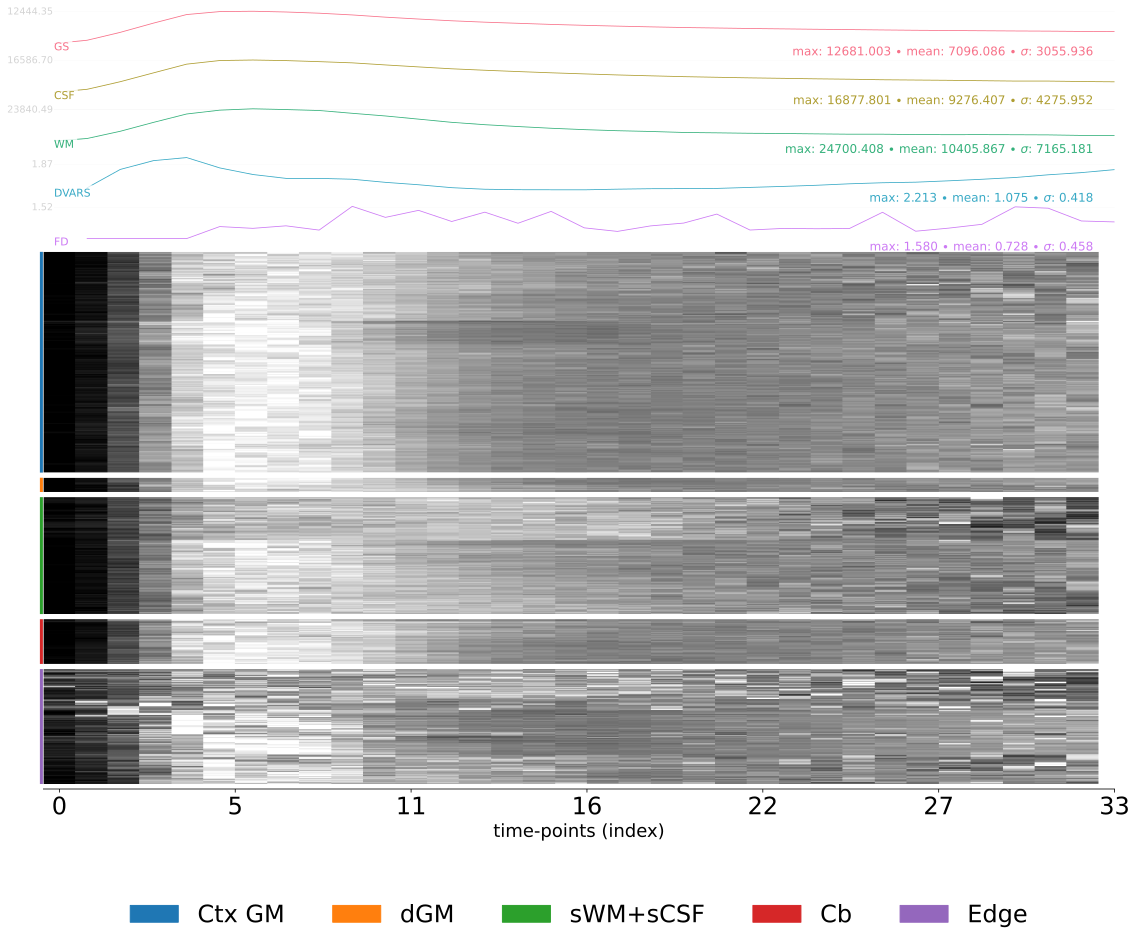
The figure shows on top several confounds estimated for the PET series: global signals (‘GS’, ‘CSF’, ‘WM’), DVARS, and framewise-displacement (‘FD’). At the bottom, a ‘carpetplot’ summarizing tracer uptake over time. The carpet plot rows correspond to voxelwise time series, and are separated into regions: cortical gray matter, deep gray matter, white matter and cerebrospinal fluid, cerebellum and the brain-edge or “crown” [Provins2022]. The crown corresponds to the voxels located on a closed band around the brain [Patriat2015].
Motion correction diagnostics are also included:
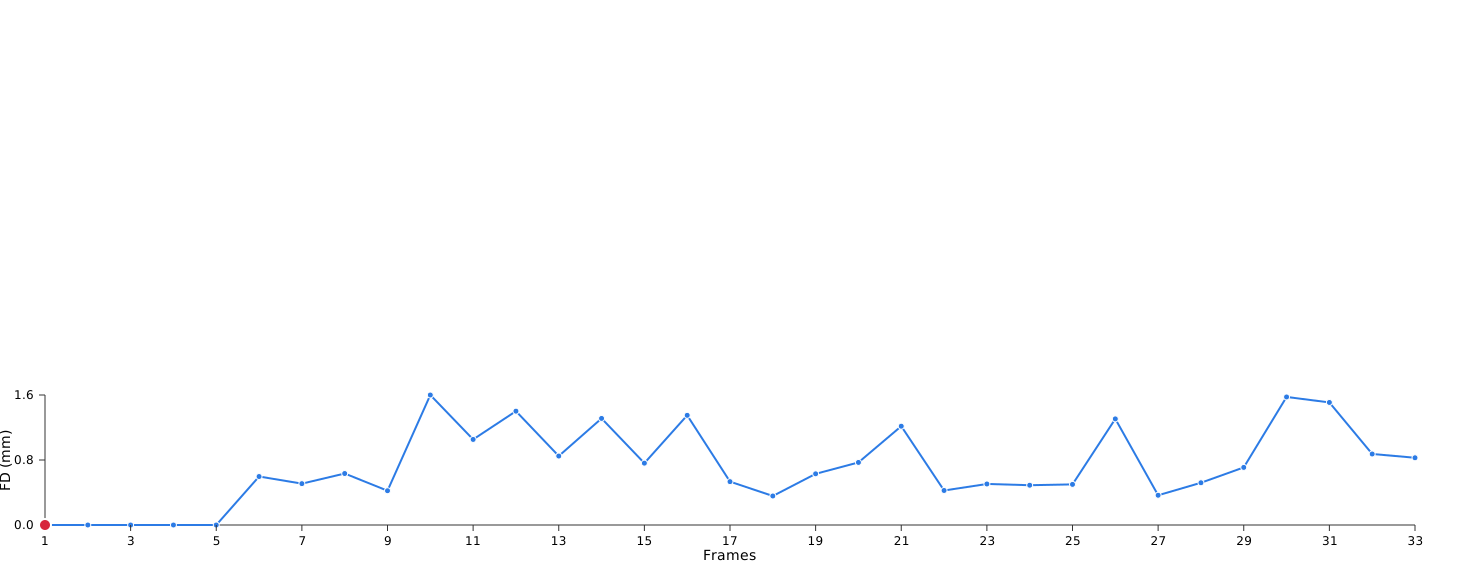
Animated before/after PET frames summarize head-motion correction, with a synchronized framewise displacement trace.
Noise components computed during each CompCor decomposition are evaluated according
to the fraction of variance that they explain across the nuisance ROI.
This is used by PETPrep to determine whether each component should be saved for
use in denoising operations: a component is saved if it contributes to explaining
the top 50 percent of variance in the nuisance ROI.
PETPrep can be configured to save all components instead using the command line
option --return-all-components.
Also included is a plot of correlations among confound regressors. This can be used to guide selection of a confound model or to assess the extent to which tissue-specific regressors correlate with global signal.
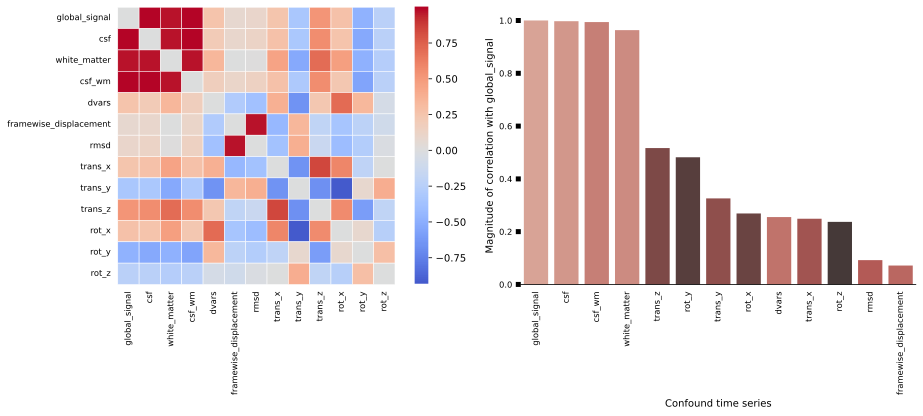
The left-hand panel shows the matrix of correlations among selected confound time series as a heat-map. The right-hand panel displays the correlation of selected confound time series with the mean global signal computed across the whole brain; the regressors shown are those with greatest correlation with the global signal. This information can be used to diagnose partial volume effects.
See implementation on init_pet_confs_wf.
Legacy layout
The legacy layout keeps PETPrep and FreeSurfer outputs in sibling
subdirectories:
<output_dir>/
  petprep/
  freesurfer/
Although this has the advantage of keeping all outputs together, it means that the top-level output directory is not itself a PETPrep BIDS Derivatives dataset, but instead contains one.
To restore this behavior, use the --output-layout legacy command-line option.
The BIDS and legacy layouts are otherwise the same in all respects. It is thus possible to achieve identical results with the BIDS layout by using the following invocation:
petprep <input_dir>/ <output_dir>/petprep/ participant \
    --fs-subjects-dir <output_dir>/freesurfer/ [OPTIONS]