Usage Notes
Warning
As of PETPrep 0.0.1, the software includes a tracking system
to report usage statistics and errors. Users can opt-out using
the --notrack command line argument.
Execution and the BIDS format
The PETPrep workflow takes as principal input the path of the dataset
that is to be processed.
The input dataset is required to be in valid BIDS format. For a subject to be processed, the selected inputs for that
subject must include at least one PET scan, unless --anat-only is
used. The workflow also requires anatomical information: either at least one
T1w structural image in the raw BIDS dataset, or reusable T1w preprocessing
derivatives supplied with --derivatives.
At the beginning of the workflow, PETPrep checks each selected subject for
these required inputs. Subjects missing PET and/or anatomical data are skipped,
and a warning is emitted before subject-level workflows are built. The run only
errors if no selected subjects remain after these checks.
We highly recommend that you validate your dataset with the free, online
BIDS Validator.
The exact command to run PETPrep depends on the Installation method. The common parts of the command follow the BIDS-Apps definition. Example:
petprep data/bids_root/ out/ participant -w work/
Further information about BIDS and BIDS-Apps can be found at the NiPreps portal.
Combining multiple PET runs within a session
Some PET datasets include multiple run acquisitions for the same
subject/session/task/tracer/reconstruction combination
(for example, for long scans where the subject is in and out of the scanner).
When the runs belong together, add --combine-runs to have PETPrep
concatenate them before building the preprocessing workflow.
Enabling --combine-runs instructs PETPrep to create a temporary,
run-less copy of the BIDS tree in the working directory. PET files are grouped
by all matching PET entities except run, suffix, extension,
datatype and space. Within each group, images are concatenated along
the frame dimension. Three-dimensional PET images are first treated as
single-frame series. Frame timing metadata from the individual sidecar JSON
files is merged with adjusted offsets, and the combined image and metadata are
written without the run entity in their filenames. Subsequent preprocessing
then operates on these merged series rather than the original per-run inputs.
Because --combine-runs removes the run entity before querying PET
files, it is intended for processing all runs in each matching group. Avoid
combining it with --run-label unless you explicitly want run labels
ignored during the combination step.
Filtering PET inputs by BIDS entities
PETPrep can restrict which PET series are preprocessed by matching BIDS
entities in the input filenames. In addition to
--participant-label and --session-label, PET-specific
filters are available through --tracer-label, --rec-label,
and --run-label. The --task-id option similarly filters PET
inputs by task.
Use --rec-label when a dataset contains multiple reconstruction
variants for the same acquisition and only a subset should be processed. The
option accepts one or more reconstruction identifiers, and the rec- prefix
is optional. For example, if a dataset includes files such as
sub-01_rec-FBP_pet.nii.gz and sub-01_rec-OSEM_pet.nii.gz, both can be
selected explicitly with:
petprep data/bids_root/ out/ participant --rec-label FBP OSEM
The equivalent command with explicit BIDS entity values is also valid:
petprep data/bids_root/ out/ participant --rec-label rec-FBP rec-OSEM
These filters apply to PET inputs only, so anatomical files are still resolved using the matching subject and session context.
The FreeSurfer license
PETPrep uses FreeSurfer tools, which require a license to run.
To obtain a FreeSurfer license, simply register for free at https://surfer.nmr.mgh.harvard.edu/registration.html.
When using manually-prepared environments or singularity, FreeSurfer will search
for a license key file first using the $FS_LICENSE environment variable and then
in the default path to the license key file ($FREESURFER_HOME/license.txt).
If using the --cleanenv flag and $FS_LICENSE is set, use --fs-license-file $FS_LICENSE
to pass the license file location to PETPrep.
It is possible to run the docker container pointing the image to a local path
where a valid license file is stored.
For example, if the license is stored in the $HOME/.licenses/freesurfer/license.txt
file on the host system:
$ docker run -ti --rm \
    -v $HOME/fullds005:/data:ro \
    -v $HOME/dockerout:/out \
    -v $HOME/.licenses/freesurfer/license.txt:/opt/freesurfer/license.txt \
    nipreps/petprep:latest \
    /data /out/out \
    participant
Using FreeSurfer can also be enabled when using petprep-docker:
$ petprep-docker --fs-license-file $HOME/.licenses/freesurfer/license.txt \
    /path/to/data/dir /path/to/output/dir participant
RUNNING: docker run --rm -it -v /path/to/data/dir:/data:ro \
    -v /home/user/.licenses/freesurfer/license.txt:/opt/freesurfer/license.txt \
    -v /path/to_output/dir:/out nipreps/petprep:0.0.1 \
    /data /out participant
...
If the environment variable $FS_LICENSE is set in the host system, then
it will automatically used by petprep-docker. For instance, the following
would be equivalent to the latest example:
$ export FS_LICENSE=$HOME/.licenses/freesurfer/license.txt
$ petprep-docker /path/to/data/dir /path/to/output/dir participant
RUNNING: docker run --rm -it -v /path/to/data/dir:/data:ro \
    -v /home/user/.licenses/freesurfer/license.txt:/opt/freesurfer/license.txt \
    -v /path/to_output/dir:/out nipreps/petprep:0.0.1 \
    /data /out participant
...
FreeSurfer submillimeter reconstruction is disabled by default in PETPrep.
This avoids very large anatomical and GTM segmentation grids when PET data are
resampled into anatomical space. To opt in for submillimeter T1w inputs, pass
--submm-recon. The --no-submm-recon flag can be used to explicitly keep
the default behavior.
Reusing precomputed derivatives
Reusing a previous, partial execution of PETPrep
PETPrep will pick up where it left off a previous execution, so long as the work directory points to the same location, and this directory has not been changed/manipulated. Some workflow nodes will rerun unconditionally, so there will always be some amount of reprocessing.
Using a previous run of FreeSurfer
PETPrep will automatically reuse previous runs of FreeSurfer if a subject directory
is found in the configured FreeSurfer subjects directory. By default this is
<output_dir>/sourcedata/freesurfer with --output-layout bids and
<output_dir>/freesurfer with --output-layout legacy.
Reconstructions for each participant will be checked for completeness, and any missing
components will be recomputed.
You can use the --fs-subjects-dir flag to specify a different location to save
FreeSurfer outputs.
If precomputed results are found, they will be reused.
If those precomputed results were generated with submillimeter reconstruction,
--no-submm-recon will not downsample or rebuild them; use a fresh
--fs-subjects-dir or rebuild the FreeSurfer subject without submillimeter
reconstruction to avoid high-resolution GTM/PET resampling.
BIDS Derivatives reuse
As of version 0.0.1, PETPrep can reuse precomputed derivatives that follow BIDS Derivatives
conventions. To provide derivatives to PETPrep, use the --derivatives (-d) flag one
or more times.
This mechanism replaces the earlier, more limited --anat-derivatives flag.
Note
Derivatives reuse is considered experimental.
This feature has several intended use-cases:
To enable PETPrep to be run in a “minimal” mode, where only the most essential derivatives are generated. This can be useful for large datasets where disk space is a concern, or for users who only need a subset of the derivatives. Further derivatives may be generated later, or by a different tool.
To enable PETPrep to be integrated into a larger processing pipeline, where other tools may generate derivatives that PETPrep can use in place of its own steps.
To enable users to substitute their own custom derivatives for those generated by PETPrep. For example, a user may wish to use a different brain extraction tool, or a different registration tool, and then use PETPrep to generate the remaining derivatives.
To enable complicated meta-workflows, where PETPrep is run multiple times with different options, and the results are combined. Processing of all sessions simultaneously would be impractical, but the anatomical processing can be done once, and then the PET processing can be done separately for each session.
See also the --level flag, which can be used to control which derivatives are
generated.
Head motion correction
PETPrep can correct for head motion in the PET data.
The head motion is estimated using a frame-based robust registration approach to an unbiased mean
volume implemented in FreeSurfer’s mri_robust_template (Reuter et al., 2010), combined with
preprocessing steps using tools from FSL (Jenkinson et al., 2012). Specifically, for the estimation
of head motion, each frame is initially smoothed with a Gaussian filter
(full-width half-maximum [FWHM] of 10 mm, --hmc-fwhm 10),
followed by thresholding at 20% of the intensity range to reduce noise and improve registration
accuracy (removing stripe artefacts from filtered back projection reconstructions).
By default, motion is estimated from frames whose midpoint is later than
120 seconds post-injection (--hmc-start-time 120), as earlier
frames often contain low count statistics. Frames before this point are
corrected with the transform estimated for the first selected frame. The robust
template estimation uses PET-oriented settings, including intensity scaling and
automatic sensitivity detection.
By default, PETPrep evaluates the frames acquired after
--hmc-start-time and initializes motion correction with the
frame exhibiting the highest tracer uptake. Provide a zero-based index
with --hmc-init-frame to override this choice. Adding
--hmc-init-frame-fix keeps whichever frame is selected (automatic or
manual) fixed during robust template estimation to improve reproducibility.
Iterations are automatically disabled to reduce runtime when --hmc-init-frame-fix is
used.
When motion correction is undesirable, use --hmc-off to disable head motion
correction entirely and keep the data unmodified apart from downstream
processing steps.
Examples:
$ petprep /data/bids_root /out participant --hmc-fwhm 8 --hmc-start-time 60
$ petprep /data/bids_root /out participant --hmc-init-frame 10 --hmc-init-frame-fix
$ petprep /data/bids_root /out participant --hmc-off
PET reference image selection
Use --petref to control how the reference volume is built from the
PET series. PET fitting currently requires frame timing metadata before the
workflow is built. PETPrep accepts FrameTimesStart or VolumeTiming for
frame starts, and FrameDuration or AcquisitionDuration for frame
durations. Strategies that average frames use these values to weight volumes;
missing timing metadata raises an error before preprocessing starts.
auto(default) builds candidate references, runs PET-to-T1w registration for each, and keeps whichever option scores best for anatomical alignment. For three-dimensional PET files,autouses the input image as the PET reference instead of building multiple candidates.templatereuses the motion-correction template, providing a consistent target for downstream registration. When--hmc-offdisables motion correction, requestingtemplateautomatically falls back totwawith a warning.twacomputes a time-weighted average, which often emphasizes later frames with higher counts and longer durations.sumproduces a straightforward summed image.first5minaverages only the first 5 minutes of PET data to capture perfusion-like uptake. When using the automatic PET reference selection, the workflow will fall back to the first frame if no frames overlap the initial 5-minute window.
Anatomical reference selection
PETPrep uses an anatomical reference when registering PET data to the structural
image. By default, --anatref auto inspects the PET-derived brain mask
volume relative to the anatomical mask. The workflow relies on the preprocessed
T1w image unless the PET mask is substantially larger than expected
(volume ratio > 1.5), in which case it automatically switches to the
non-uniformity corrected nu.mgz volume produced by FreeSurfer to improve
co-registration robustness. You can force either option with
--anatref t1w or --anatref nu.
Anatomical co-registration
PETPrep aligns the PET reference volume to the T1-weighted anatomy before
deriving downstream outputs. The anatomical image is first trimmed with
FSL’s robustfov to remove the shoulder/neck and masked to limit registration
to brain voxels. In auto mode, if all cropped registration scores are weak
for a PET reference, PETPrep evaluates an uncropped anatomical fallback and keeps
it if the score improves. Use --pet2anat-no-anat-crop to disable both
the anatomical robustfov trim and the uncropped fallback when testing
datasets where non-brain uptake may help guide co-registration. Choose the
registration backend with
--pet2anat-method: auto
(default; runs both FreeSurfer and ANTs and selects the better result),
mri_coreg (FreeSurfer co-registration), robust (FreeSurfer
mri_robust_register with an NMI cost function), or ants (ANTs rigid
registration that consumes the unmasked T1w and a separate mask). The
--pet2anat-dof flag controls the degrees of freedom; robust and
ants are limited to rigid-body alignment and therefore require
--pet2anat-dof 6. All modes emit paired ITK transforms for reuse in later
resampling steps.
Segmentation
PETPrep can segment the brain into different brain regions and extract time activity curves from these regions.
The --seg flag selects the segmentation method to use.
Available options are gtm (default) whole-brain segmentation from FreeSurfer, brainstem, wm (white matter), aparcaseg (FreeSurfer aparc+aseg.mgz), thalamicNuclei, hippocampusAmygdala, raphe, and limbic. Atlas-based segmentations can also be selected with --seg; the atlas choices are HOCPA (harvard-oxford atlas), the Schaefer 2018 atlas variants listed in Atlas Segmentation, and MASSP20 (subcortical atlas). When an atlas is selected, PETPrep automatically adds the atlas template to --output-spaces and warps the atlas and its label file into anatomical space. For more information about the atlas choices, see the section Atlas Segmentation.
The gtm segmentation is a whole-brain segmentation that includes the
cerebral cortex, subcortical structures, and cerebellum.
To run the segmentation with the default gtm method, use:
$ petprep /data/bids_root /out participant --seg gtm
Atlas Segmentation
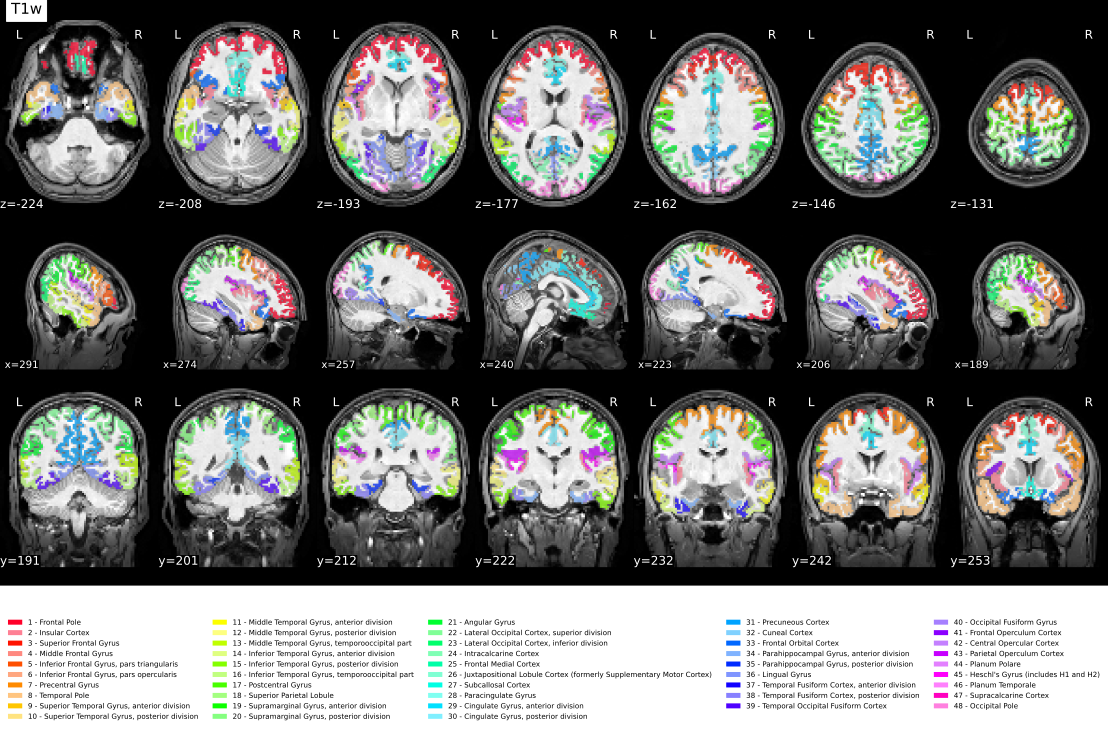
PETPrep currently supports three atlas variants for segmentation:
HOCPA : the Harvard-Oxford cortical and subcortical atlas (HOCPA)
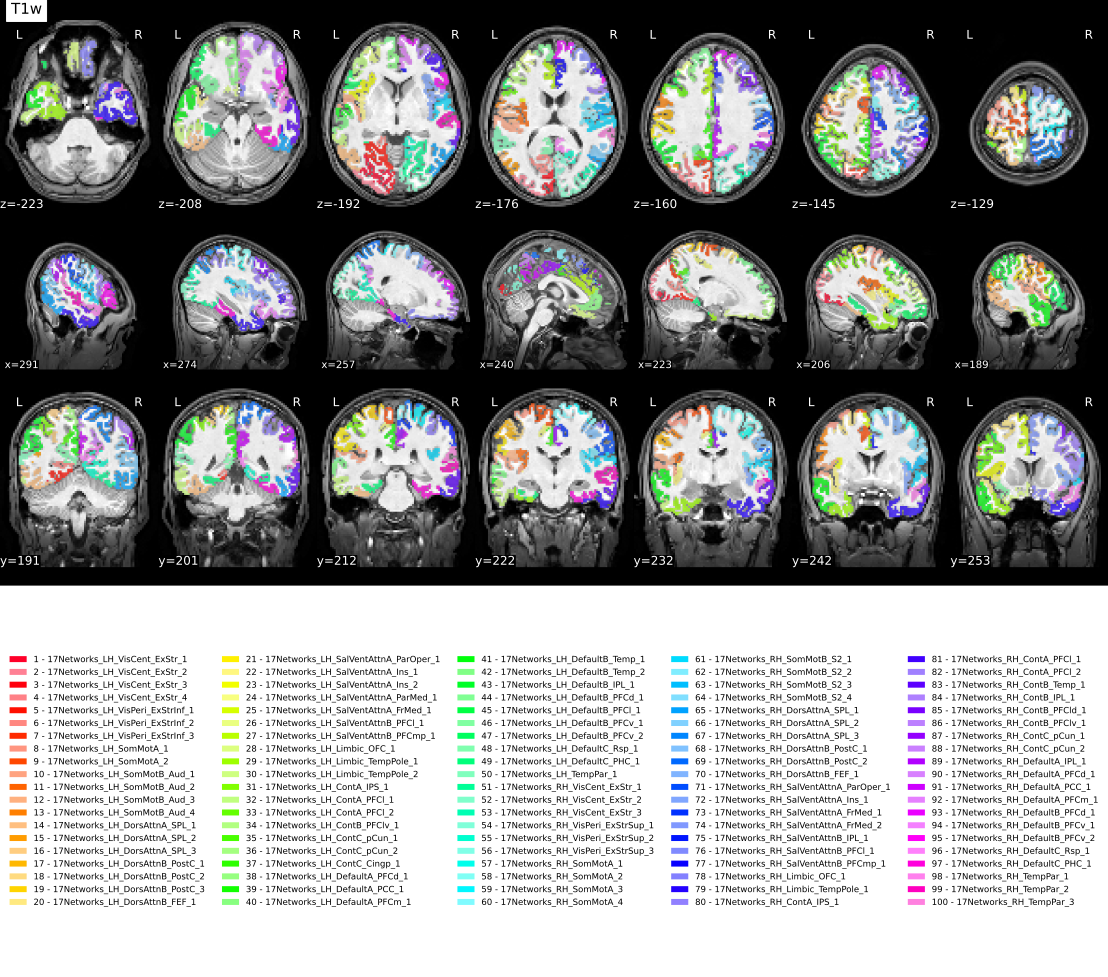
Schaefer2018* : the Schaefer 2018 cortical parcellation (--seg options).
Available in resolutions of 100–1000 parcels, each with either 7 or 17 networks.
Format:
Schaefer2018<N>Parcels7NetworksSchaefer2018<N>Parcels17Networks
Where <N> is one of 100, 200, 300, 400, 500, 600,
800 or 1000.
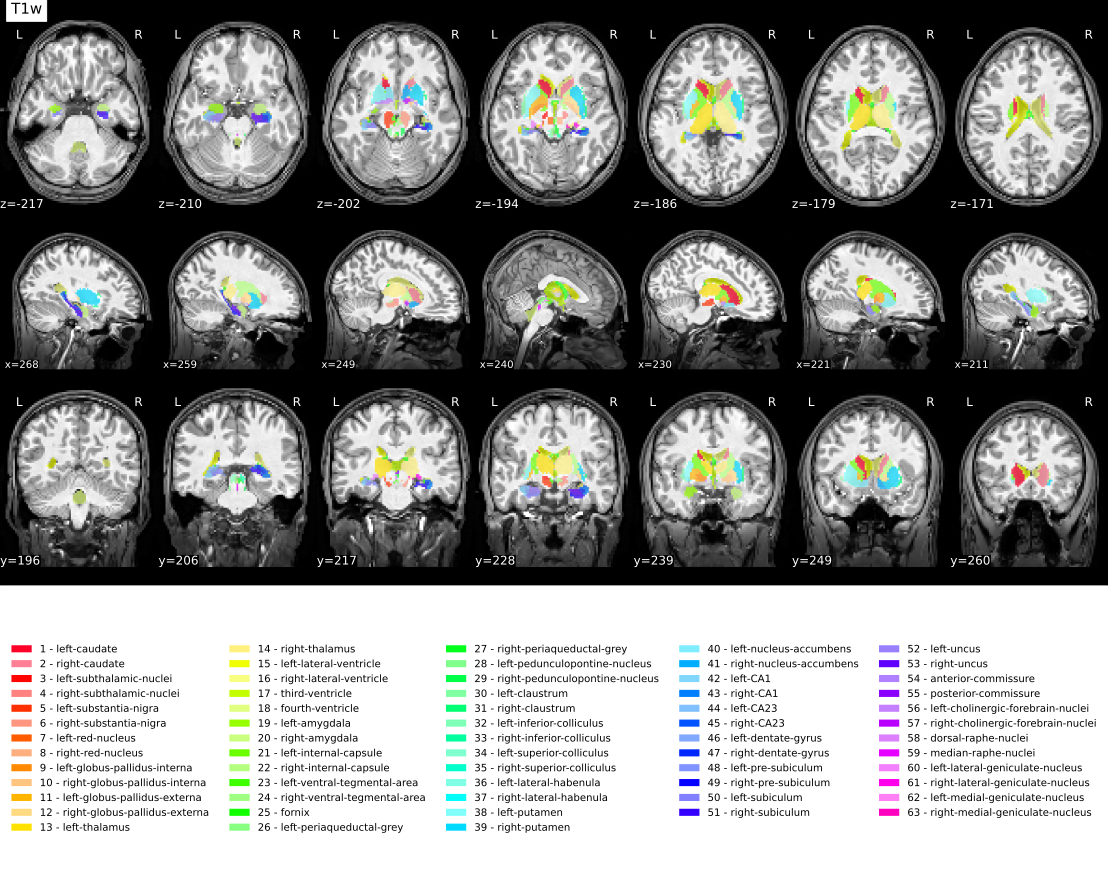
MASSP20 : the MASSP20 subcortical atlas. When an atlas is selected with --seg, PETPrep automatically adds the corresponding template to the --output-spaces and warps the atlas and its label file into anatomical space. For more information about these atlases, see their respective publications:
References
MASSP20
Bazin P-L, Groot JM, Miletic S, Groenewegen L, Trutti AC, Mulder MJ, Forstmann B.U., Alkemade A. Automated parcellation and atlasing of the human subcortex with ultra-high resolution quantitative MRI. Imaging Neuroscience. 2025;3:imag_a_00560. doi: 10.1162/imag_a_00560.
Schaefer2018 atlas variants
Schaefer 2018 parcellation repository: https://github.com/ThomasYeoLab/CBIG/tree/v0.14.3-Update_Yeo2011_Schaefer2018_labelname/stable_projects/brain_parcellation/Schaefer2018_LocalGlobal/Parcellations. Accessed: 2021-05-19.
HOCPA (Harvard-Oxford cortical and subcortical atlas)
Makris N, Goldstein JM, Kennedy D, Hodge SM, Caviness VS, Faraone SV, Tsuang MT, Seidman LJ. Decreased volume of left and total anterior insular lobule in schizophrenia. Schizophrenia Research. 2006;83(2-3):155-171. doi: 10.1016/j.schres.2005.11.020.
Desikan RS, Ségonne F, Fischl B, Quinn BT, Dickerson BC, Blacker D, Buckner RL, Dale AM, Maguire RP, Hyman BT, et al. An automated labeling system for subdividing the human cerebral cortex on MRI scans into gyral based regions of interest. NeuroImage. 2006;31(3):968-980.
Frazier JA, Chiu S, Breeze JL, Makris N, Lange N, Kennedy DN, Herbert MR, Bent EK, Koneru VK, Dieterich ME, et al. Structural brain magnetic resonance imaging of limbic and thalamic volumes in pediatric bipolar disorder. American Journal of Psychiatry. 2005;162(7):1256-1265.
Goldstein JM, Seidman LJ, Makris N, Ahern T, O’Brien LM, Caviness VS Jr, Kennedy DN, Faraone SV, Tsuang MT. Hypothalamic abnormalities in schizophrenia: sex effects and genetic vulnerability. Biological Psychiatry. 2007;61(8):935-945.
Partial volume correction
PETPrep can optionally correct PET images for partial volume effects.
The --pvc-tool flag selects the tool to use (petpvc or petsurfer),
while --pvc-method chooses the specific algorithm provided by that tool.
Available petpvc methods are GTM, LABBE, RL, VC, RBV,
LABBE+RBV, RBV+VC, RBV+RL, LABBE+RBV+VC, LABBE+RBV+RL,
STC, MTC, LABBE+MTC, MTC+VC, MTC+RL, LABBE+MTC+VC,
LABBE+MTC+RL, IY, IY+VC, IY+RL, MG, MG+VC and MG+RL.
petsurfer provides GTM, MG, RBV and AGTM.
AGTM runs in two steps: first the motion corrected frames are averaged
to generate a reference image. Then a geometric transfer matrix is optimised
using that reference together with the point spread function. As a
consequence, decent motion correction of the input frames and a reliable PSF
estimate are prerequisites for AGTM to succeed.
Use --pvc-psf to specify the point spread function FWHM, either as a single
value or three values. The options --pvc-tool, --pvc-method and
--pvc-psf must be supplied together. petpvc accepts either one isotropic
PSF value or three values for the x/y/z FWHM. petsurfer uses an isotropic
PSF, so only the first value is used when several values are provided.
When PVC is enabled, the corrected image automatically feeds into the remainder of the workflow, and standard-space outputs are derived from this PVC-corrected series. The corrected data are first aligned to the T1-weighted anatomy, and only the anatomical-to-template transforms are applied for further resampling.
For example, to run PVC using the petpvc implementation together with the --seg gtm (default) and the GTM
method with a 5 mm PSF:
$ petprep /data/bids_root /out participant \
    --pvc-tool petpvc --pvc-method GTM --pvc-psf 5
To run AGTM with petsurfer instead:
$ petprep /data/bids_root /out participant \
    --pvc-tool petsurfer --pvc-method AGTM --pvc-psf 5
Please note that the petsurfer implementation of PVC requires the gtm segmentation --seg gtm, whereas
the petpvc implementation can use any segmentation method.
Reference region masks
PETPrep can build masks and time activity curves for reference regions used in pharmacokinetic quantification.
Use --ref-mask-name to select a predefined region and
--ref-mask-index to override the label indices.
The available masks are and do not require --ref-mask-index to be specified:
cerebellum: Cerebellar gray matter (requires the--seg gtmoption).semiovale: White matter in the centrum semiovale (requires the--seg wmoption).neocortex: Neocortical gray matter (requires the--seg gtmoption).thalamus: Thalamic gray matter (requires the--seg gtmoption).cc: Corpus callosum labels 251-255 (requires the--seg aparcasegoption).
The presets are defined in petprep/data/reference_mask/config.json.
When a reference mask is created, PETPrep also generates a TSV table
label-<name>_desc-ref_morph.tsv saved under the anat/ derivatives folder. This
table mirrors the segmentation morph tables and contains three columns:
index, name and volume-mm3.
If you want to use a custom mask, you can provide it using the --ref-mask-name and --ref-mask-index options,
specifying the name and indices of your choice for a given segmentation (--seg).
For example, to extract a mask of thalamus to use as a reference region, you can run:
$ petprep /data/bids_root /out participant \
    --seg gtm --ref-mask-name thalamus --ref-mask-index 10 49
The indices of the regions from a given segmentation can be found in the corresponding /anat/sub-<participant_label>_seg-<segmentation>_morph.tsv.
Command-Line Arguments
PETPrep: PET PREProcessing workflows v0.0.8
usage: petprep [-h] [--skip_bids_validation]
               [--participant-label PARTICIPANT_LABEL [PARTICIPANT_LABEL ...]]
               [--session-label SESSION_LABEL [SESSION_LABEL ...]]
               [--tracer-label TRACER_LABEL [TRACER_LABEL ...]]
               [--rec-label REC_LABEL [REC_LABEL ...]]
               [--run-label RUN_LABEL [RUN_LABEL ...]] [--combine-runs]
               [--subject-anatomical-reference {first-lex,unbiased,sessionwise}]
               [-t TASK_ID] [--bids-filter-file FILE]
               [-d PACKAGE=PATH [PACKAGE=PATH ...]] [--bids-database-dir PATH]
               [--nprocs NPROCS] [--omp-nthreads OMP_NTHREADS]
               [--mem MEMORY_MB] [--low-mem] [--use-plugin FILE] [--sloppy]
               [--anat-only] [--level {minimal,resampling,full}]
               [--boilerplate-only] [--reports-only]
               [--ignore {t2w,flair} [{t2w,flair} ...]]
               [--output-spaces [OUTPUT_SPACES ...]] [--longitudinal]
               [--pet2anat-dof {6,9,12}]
               [--pet2anat-method {mri_coreg,robust,ants,auto}]
               [--pet2anat-no-anat-crop] [--anatref {t1w,nu,auto}]
               [--force-bbr] [--force-no-bbr] [--random-seed _RANDOM_SEED]
               [--output-layout {bids,legacy}]
               [--aggregate-session-reports AGGR_SES_REPORTS]
               [--medial-surface-nan] [--project-goodvoxels]
               [--md-only-boilerplate] [--cifti-output [{91k,170k}]]
               [--no-msm] [--return-all-components]
               [--fd-spike-threshold REGRESSORS_FD_TH]
               [--dvars-spike-threshold REGRESSORS_DVARS_TH]
               [--skull-strip-template SKULL_STRIP_TEMPLATE]
               [--skull-strip-fixed-seed]
               [--skull-strip-t1w {auto,skip,force}] [--fs-license-file FILE]
               [--submm-recon | --no-submm-recon]
               [--fs-subjects-dir PATH | --fs-no-reconall] [--fs-no-resume]
               [--hmc-fwhm HMC_FWHM] [--hmc-start-time HMC_START_TIME]
               [--hmc-init-frame [HMC_INIT_FRAME]] [--hmc-init-frame-fix]
               [--hmc-off] [--petref {template,twa,sum,first5min,auto}]
               [--seg {gtm,brainstem,thalamicNuclei,hippocampusAmygdala,wm,aparcaseg,raphe,limbic,HOCPA,MASSP20,Schaefer20181000Parcels17Networks,Schaefer20181000Parcels7Networks,Schaefer2018100Parcels17Networks,Schaefer2018100Parcels7Networks,Schaefer2018200Parcels17Networks,Schaefer2018200Parcels7Networks,Schaefer2018300Parcels17Networks,Schaefer2018300Parcels7Networks,Schaefer2018400Parcels17Networks,Schaefer2018400Parcels7Networks,Schaefer2018500Parcels17Networks,Schaefer2018500Parcels7Networks,Schaefer2018600Parcels17Networks,Schaefer2018600Parcels7Networks,Schaefer2018800Parcels17Networks,Schaefer2018800Parcels7Networks}]
               [--ref-mask-name REF_MASK_NAME]
               [--ref-mask-index REF_MASK_INDEX [REF_MASK_INDEX ...]]
               [--pvc-tool {petpvc,petsurfer}]
               [--pvc-method {AGTM,GTM,IY,IY+RL,IY+VC,LABBE,LABBE+MTC,LABBE+MTC+RL,LABBE+MTC+VC,LABBE+RBV,LABBE+RBV+RL,LABBE+RBV+VC,MG,MG+RL,MG+VC,MTC,MTC+RL,MTC+VC,RBV,RBV+RL,RBV+VC,RL,STC,VC}]
               [--pvc-psf PVC_PSF [PVC_PSF ...]] [--track-carbon]
               [--country-code COUNTRY_CODE] [--version] [-v] [-w WORK_DIR]
               [--clean-workdir] [--resource-monitor] [--config-file FILE]
               [--write-graph] [--stop-on-first-crash] [--notrack]
               [--debug {pdb,debug,all} [{pdb,debug,all} ...]]
               bids_dir output_dir {participant}
Positional Arguments
- bids_dir
The root folder of a BIDS valid dataset (sub-XXXXX folders should be found at the top level in this folder).
- output_dir
The output path for the outcomes of preprocessing and visual reports
- analysis_level
Possible choices: participant
Processing stage to be run, only “participant” in the case of PETPrep (see BIDS-Apps specification).
Options for filtering BIDS queries
- --skip_bids_validation, --skip-bids-validation
Assume the input dataset is BIDS compliant and skip the validation
- --participant-label, --participant_label
A space delimited list of participant identifiers or a single identifier (the sub- prefix can be removed)
- --session-label
A space delimited list of session identifiers or a single identifier (the ses- prefix can be removed)
- --tracer-label
A space delimited list of tracer identifiers or a single identifier (the trc- prefix can be removed)
- --rec-label
A space delimited list of reconstruction identifiers or a single identifier (the rec- prefix can be removed)
- --run-label
A space delimited list of run identifiers or a single identifier (the run- prefix can be removed)
- --combine-runs
Concatenate PET runs within each session before preprocessing. Combined files omit the run entity.
- --subject-anatomical-reference
Possible choices: first-lex, unbiased, sessionwise
Method to produce the reference anatomical space: “first-lex” uses the first T1w image in lexicographical order; “unbiased” constructs an unbiased template from all T1w images (previously “–longitudinal”); “sessionwise” independently processes each session, with multiple runs within a session handled similarly to “first-lex”.
- -t, --task-id
Select a specific task to be processed
- --bids-filter-file
A JSON file describing custom BIDS input filters using PyBIDS. For further details, please check out https://petprep.readthedocs.io/en/0.0.8/faq.html#how-do-I-select-only-certain-files-to-be-input-to-PETPrep
- -d, --derivatives
Search PATH(s) for pre-computed derivatives. These may be provided as named folders (e.g., –derivatives smriprep=/path/to/smriprep).
- --bids-database-dir
Path to a PyBIDS database folder, for faster indexing (especially useful for large datasets). Will be created if not present.
Options to handle performance
- --nprocs, --nthreads, --n_cpus, --n-cpus
Maximum number of threads across all processes
- --omp-nthreads
Maximum number of threads per-process
- --mem, --mem_mb, --mem-mb
Upper bound memory limit for PETPrep processes
- --low-mem
Attempt to reduce memory usage (will increase disk usage in working directory)
- --use-plugin, --nipype-plugin-file
Nipype plugin configuration file
- --sloppy
Use low-quality tools for speed - TESTING ONLY
Options for performing only a subset of the workflow
- --anat-only
Run anatomical workflows only
- --level
Possible choices: minimal, resampling, full
Processing level; may be ‘minimal’ (nothing that can be recomputed), ‘resampling’ (recomputable targets that aid in resampling) or ‘full’ (all target outputs).
- --boilerplate-only, --boilerplate_only
Generate boilerplate only
- --reports-only
Only generate reports, don’t run workflows. This will only rerun report aggregation, not reportlet generation for specific nodes.
Workflow configuration
- --ignore
Possible choices: t2w, flair
Ignore selected aspects of the input dataset to disable corresponding parts of the workflow (a space delimited list)
- --output-spaces
Standard and non-standard spaces to resample anatomical and PET images to. Standard spaces may be specified by the form
<SPACE>[:cohort-<label>][:res-<resolution>][...], where<SPACE>is a keyword designating a spatial reference, and may be followed by optional, colon-separated parameters. Non-standard spaces imply specific orientations and sampling grids. Important to note, theres-*modifier does not define the resolution used for the spatial normalization. To generate no PET outputs, use this option without specifying any spatial references. For further details, please check out https://petprep.readthedocs.io/en/0.0.8/spaces.html- --longitudinal
Deprecated - use –subject-anatomical-reference unbiased instead
- --pet2anat-dof
Possible choices: 6, 9, 12
Degrees of freedom when registering PET to anatomical images. 6 degrees (rotation and translation) are used by default.
- --pet2anat-method
Possible choices: mri_coreg, robust, ants, auto
Method for PET-to-anatomical registration. “auto” runs both FreeSurfer and ANTs and selects the best. “mri_coreg” uses FreeSurfer mri_coreg. “robust” uses FreeSurfer mri_robust_register (6 DoF only). “ants” uses ANTs rigid registration (6 DoF only).
- --pet2anat-no-anat-crop
Disable robust FOV cropping of the anatomical reference before PET-to-T1w registration. This also disables the auto-mode uncropped anatomical fallback.
- --anatref
Possible choices: t1w, nu, auto
Anatomical reference to use for PET-to-T1w registration. The default (‘auto’) inspects the PET-derived mask and uses the preprocessed T1-weighted image unless the mask is unusually large, in which case it switches to FreeSurfer’s bias-corrected nu.mgz. Use ‘t1w’ to always keep the preprocessed T1w image, or ‘nu’ to always prefer FreeSurfer’s bias-corrected volume (an intensity normalized volume generated after correcting for non-uniformity in the orig.mgz).
- --force-bbr
Deprecated - use –force bbr instead.
- --force-no-bbr
Deprecated - use –force no-bbr instead.
- --random-seed
Initialize the random seed for the workflow
- --project-goodvoxels
Exclude voxels whose timeseries have locally high coefficient of variation from surface resampling. Only performed for GIFTI files mapped to a freesurfer subject (fsaverage or fsnative).
Options for modulating outputs
- --output-layout
Possible choices: bids, legacy
Organization of outputs. “bids” (default) places PETPrep derivatives directly in the output directory, and defaults to placing FreeSurfer derivatives in <output-dir>/sourcedata/freesurfer. “legacy” creates derivative datasets as subdirectories of outputs.
- --aggregate-session-reports
Maximum number of sessions aggregated in one subject’s visual report. If exceeded, visual reports are split by session.
- --medial-surface-nan
Replace medial wall values with NaNs on PET GIFTI files. Only performed for GIFTI files mapped to a freesurfer subject (fsaverage or fsnative).
- --md-only-boilerplate
Skip generation of HTML and LaTeX formatted citation with pandoc
- --cifti-output
Possible choices: 91k, 170k
Output preprocessed PET as a CIFTI dense timeseries. Optionally, the number of grayordinate can be specified (default is 91k, which equates to 2mm resolution)
- --no-msm
Disable Multimodal Surface Matching surface registration.
Options relating to confounds
- --return-all-components
Include all components estimated in CompCor decomposition in the confounds file instead of only the components sufficient to explain 50 percent of PET variance in each CompCor mask
- --fd-spike-threshold
Threshold for flagging a frame as an outlier on the basis of framewise displacement
- --dvars-spike-threshold
Threshold for flagging a frame as an outlier on the basis of standardised DVARS
Specific options for ANTs registrations
- --skull-strip-template
Select a template for skull-stripping with antsBrainExtraction (OASIS30ANTs, by default)
- --skull-strip-fixed-seed
Do not use a random seed for skull-stripping - will ensure run-to-run replicability when used with –omp-nthreads 1 and matching –random-seed <int>
- --skull-strip-t1w
Possible choices: auto, skip, force
Perform T1-weighted skull stripping (‘force’ ensures skull stripping, ‘skip’ ignores skull stripping, and ‘auto’ applies brain extraction based on the outcome of a heuristic to check whether the brain is already masked).
Specific options for FreeSurfer preprocessing
- --fs-license-file
Path to FreeSurfer license key file. Get it (for free) by registering at https://surfer.nmr.mgh.harvard.edu/registration.html
- --submm-recon
Enable FreeSurfer sub-millimeter (hires) reconstruction.
- --no-submm-recon
Disable FreeSurfer sub-millimeter (hires) reconstruction.
- --fs-subjects-dir
Path to existing FreeSurfer subjects directory to reuse. (default: OUTPUT_DIR/freesurfer)
- --fs-no-reconall
Disable FreeSurfer surface preprocessing.
- --fs-no-resume
EXPERT: Import pre-computed FreeSurfer reconstruction without resuming. The user is responsible for ensuring that all necessary files are present.
Options for head motion correction
- --hmc-fwhm
FWHM for Gaussian smoothing applied during head-motion estimation.
- --hmc-start-time
Time (in seconds) after which head-motion estimation is performed.
- --hmc-init-frame
Initial frame index for head-motion estimation; omit or use ‘auto’ to select the frame with highest uptake.
- --hmc-init-frame-fix
Keep the chosen initial reference frame fixed during head-motion estimation.
- --hmc-off
Disable head-motion correction and use the uncorrected data.
- --petref
Possible choices: template, twa, sum, first5min, auto
Strategy for generating the PET reference. ‘auto’ (default) evaluates multiple strategies to select the best reference. ‘template’ uses the motion correction template, while ‘twa’ computes a time-weighted average, ‘sum’ produces a summed image of the motion-corrected series, and ‘first5min’ averages the early (0-5 minute) portion of the acquisition.
Segmentation options
- --seg
Possible choices: gtm, brainstem, thalamicNuclei, hippocampusAmygdala, wm, aparcaseg, raphe, limbic, HOCPA, MASSP20, Schaefer20181000Parcels17Networks, Schaefer20181000Parcels7Networks, Schaefer2018100Parcels17Networks, Schaefer2018100Parcels7Networks, Schaefer2018200Parcels17Networks, Schaefer2018200Parcels7Networks, Schaefer2018300Parcels17Networks, Schaefer2018300Parcels7Networks, Schaefer2018400Parcels17Networks, Schaefer2018400Parcels7Networks, Schaefer2018500Parcels17Networks, Schaefer2018500Parcels7Networks, Schaefer2018600Parcels17Networks, Schaefer2018600Parcels7Networks, Schaefer2018800Parcels17Networks, Schaefer2018800Parcels7Networks
Segmentation method to use.
Options for reference mask generation
- --ref-mask-name
Predefined reference regions. Pair with –ref-mask-index to define custom labels.
- --ref-mask-index
List of segmentation indices to use for the reference mask.
Options for partial volume correction
- --pvc-tool
Possible choices: petpvc, petsurfer
Tool to use for partial volume correction
- --pvc-method
Possible choices: AGTM, GTM, IY, IY+RL, IY+VC, LABBE, LABBE+MTC, LABBE+MTC+RL, LABBE+MTC+VC, LABBE+RBV, LABBE+RBV+RL, LABBE+RBV+VC, MG, MG+RL, MG+VC, MTC, MTC+RL, MTC+VC, RBV, RBV+RL, RBV+VC, RL, STC, VC
PVC method identifier. PETPVC: GTM, IY, IY+RL, IY+VC, LABBE, LABBE+MTC, LABBE+MTC+RL, LABBE+MTC+VC, LABBE+RBV, LABBE+RBV+RL, LABBE+RBV+VC, MG, MG+RL, MG+VC, MTC, MTC+RL, MTC+VC, RBV, RBV+RL, RBV+VC, RL, STC, VC. PETSurfer: AGTM, GTM, MG, RBV.
- --pvc-psf
Point spread function FWHM (one value or three values)
Options for carbon usage tracking
- --track-carbon
Tracks power draws using CodeCarbon package
- --country-code
Country ISO code used by carbon trackers
Other options
- --version
show program’s version number and exit
- -v, --verbose
Increases log verbosity for each occurrence, debug level is -vvv
- -w, --work-dir
Path where intermediate results should be stored
- --clean-workdir
Clears working directory of contents. Use of this flag is not recommended when running concurrent processes of PETPrep.
- --resource-monitor
Enable Nipype’s resource monitoring to keep track of memory and CPU usage
- --config-file
Use pre-generated configuration file. Values in file will be overridden by command-line arguments.
- --write-graph
Write workflow graph.
- --stop-on-first-crash
Force stopping on first crash, even if a work directory was specified.
- --notrack
Opt-out of sending tracking information of this run to the PETPrep developers. This information helps to improve PETPrep and provides an indicator of real world usage crucial for obtaining funding.
- --debug
Possible choices: pdb, debug, all
Debug mode(s) to enable. ‘all’ is alias for all available modes.
The command-line interface of the docker wrapper
The PETPrep on Docker wrapper
This is a lightweight Python wrapper to run PETPrep. Docker must be installed and running. This can be checked running
docker info
Please acknowledge this work using the citation boilerplate that PETPrep includes in the visual report generated for every subject processed. For a more detailed description of the citation boilerplate and its relevance, please check out the NiPreps documentation. Please report any feedback to our GitHub repository.
usage: petprep-docker [-h] [--version] [-i IMG] [-w WORK_DIR]
                      [--output-spaces [OUTPUT_SPACES ...]]
                      [--fs-license-file PATH] [--fs-subjects-dir PATH]
                      [--config-file PATH] [-d PATH [PATH ...]]
                      [--use-plugin PATH] [--bids-database-dir PATH]
                      [--bids-filter-file PATH]
                      [--patch PACKAGE=PATH [PACKAGE=PATH ...]] [--shell]
                      [--config PATH] [-e ENV_VAR value] [-u USER]
                      [--network NETWORK] [--no-tty]
                      [bids_dir] [output_dir] [{participant}]
Positional Arguments
- bids_dir
- output_dir
- analysis_level
Possible choices: participant
Named Arguments
- -h, --help
show this help message and exit
- --version
show program’s version number and exit
- -i, --image
image name
Wrapper options
Standard options that require mapping files into the container; see petprep usage for complete descriptions
- -w, --work-dir
- --output-spaces
- --fs-license-file
- --fs-subjects-dir
- --config-file
- -d, --derivatives
Search PATH(s) for pre-computed derivatives.
- --use-plugin
- --bids-database-dir
- --bids-filter-file
Developer options
Tools for testing and debugging PETPrep
- --patch
Sequence of PACKAGE=PATH specifications to patch a Python package into the container Python environment.
- --shell
Open shell in image instead of running PETPrep
- --config
Use custom nipype.cfg file
- -e, --env
Set custom environment variables within container
- -u, --user
Run container as a given user/uid. Additionally, group/gid can beassigned, (i.e., –user <UID>:<GID>)
- --network
Run container with a different network driver (“none” to simulate no internet connection)
- --no-tty
Run docker without TTY flag -it
Limitations and reasons not to use PETPrep
Very narrow FoV images oftentimes do not contain enough information for standard image registration methods to work correctly. Also, problems may arise when extracting the brain from these data. PETPrep supports pre-aligned PET data, and accepting pre-computed derivatives such as brain masks and atlases are a target of future effort.
PETPrep may also underperform for particular populations (e.g., infants) and non-human brains, although appropriate templates can be provided to overcome the issue.
If you are working with blocking data, be aware that the motion correction step may not perform optimally.
If you really want unlimited flexibility (which is obviously a double-edged sword).
If you want students to suffer through implementing each step for didactic purposes, or to learn shell-scripting or Python along the way.
If you are trying to reproduce some in-house lab pipeline.
(Reasons 4-6 were kindly provided by S. Nastase in his open review of our pre-print).
Troubleshooting
Logs and crashfiles are output into the
<output_dir>/sub-<participant_label>/log directory when using the default
--output-layout bids. With --output-layout legacy, logs are written
under <output_dir>/petprep/sub-<participant_label>/log.
Information on how to customize and understand these files can be found on the
Debugging Nipype Workflows
page.
Support and communication. The documentation of this project is found here: https://petprep.org/en/latest/.
All bugs, concerns and enhancement requests for this software can be submitted here: https://github.com/nipreps/petprep/issues.
If you have a problem or would like to ask a question about how to use PETPrep,
please submit a question to NeuroStars.org with a petprep tag.
NeuroStars.org is a platform similar to StackOverflow but dedicated to neuroinformatics.
Previous questions about PETPrep are available here: https://neurostars.org/tag/petprep/
To participate in the PETPrep development-related discussions please use the following mailing list: https://mail.python.org/mailman/listinfo/neuroimaging Please add [petprep] to the subject line when posting on the mailing list.
About the NiPreps framework licensing
Please check https://www.nipreps.org/community/licensing/ for detailed information on the criteria we use to license PETPrep and other projects of the framework.
License information
Copyright (c) 2025, the NiPreps Developers.
As of the 0.0.x pre-release and release series, PETPrep is licensed under the Apache License, Version 2.0 (the “License”); you may not use this file except in compliance with the License. You may obtain a copy of the License at http://www.apache.org/licenses/LICENSE-2.0
Unless required by applicable law or agreed to in writing, software distributed under the License is distributed on an “AS IS” BASIS, WITHOUT WARRANTIES OR CONDITIONS OF ANY KIND, either express or implied. See the License for the specific language governing permissions and limitations under the License.
Copyright (c) 2025-, the NiPreps developers. All rights reserved.
All trademarks referenced herein are property of their respective holders.
The petprep-wrapper for Docker
Copyright (c) 2025-, the NiPreps Developers. All rights reserved.
PETPrep-wrapper is licensed under the BSD 3-clause license. You may obtain a copy of the License at https://opensource.org/licenses/BSD-3-Clause
All trademarks referenced herein are property of their respective holders.